3.4 Objects
The Targets button in the sidebar opens what a wait can watch for, in four tabs. Every tab is the same kind of list; this is Object. How to make each one is on Targets.
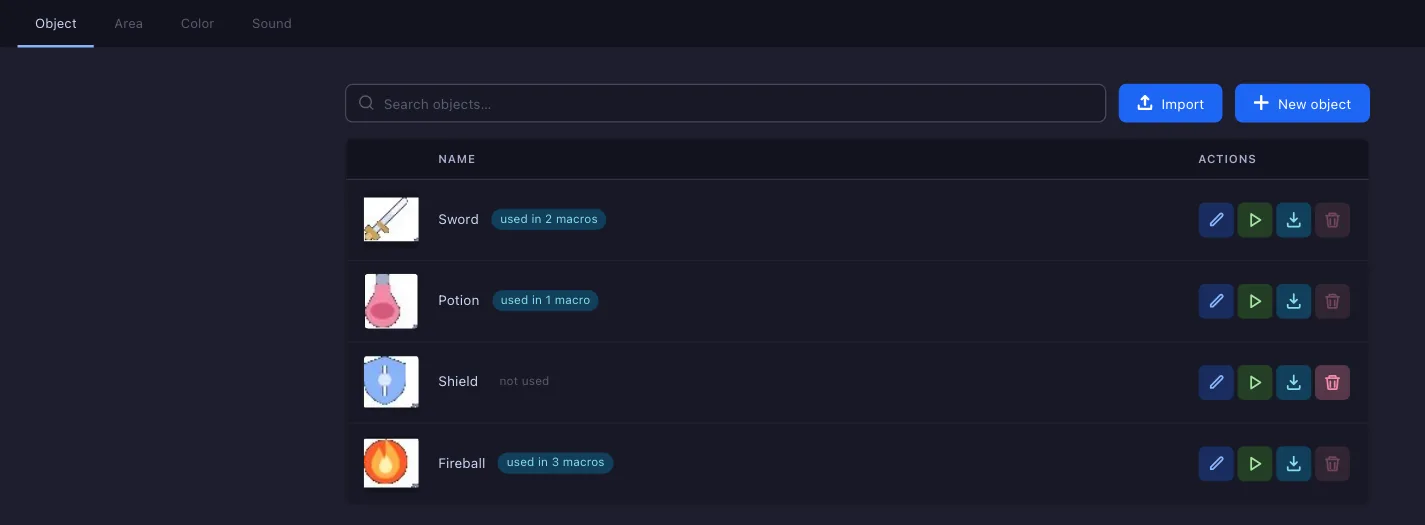
- Tabs — Object, a picture to find; Area, a saved answer to where to look; Color, a bar to read; Sound, a sound to hear.
- Search — filters the list by name.
- Import — loads one from a file made with Export (8).
- New object — opens the object editor: pick a screenshot, cut the object out, set how closely it has to match. See New object.
- Used in — how many macros, areas and colours use it; hover for their names.
- Edit — opens it in its editor.
- Check — runs the search on a saved screenshot and shows where it is found.
- Export — saves it to a file for Import (3).
- Delete — only while nothing uses it. Until then the button is off, and its tooltip names what uses it.
An object that belongs to one macro is not listed here. It lives in that macro's object picker, on the Private tab, and is deleted with the macro.